
People & Memory
How botts.ai groups the people your agents talk to, and how optional Customer Memory lets an agent remember facts about returning customers across conversations.
Every visitor, caller, or WhatsApp contact who talks to one of your agents is recorded as an end user (a person). The Chats page on an agent (its People view) lets you browse those people, read their past conversations, and — when Customer Memory is enabled — review and edit what the agent has learned about them.
Memory is off by default. You turn it on per agent. Once enabled, the agent extracts a short list of persistent facts plus a rolling summary after each conversation ends, and reuses them the next time the same person comes back.
Who can see People & Memory
People and memory are part of the build/analytics surface, not the chat surface. Access is by role.
| Role | View People & memory | Edit / delete memory |
|---|---|---|
| Owner | Yes | Yes |
| Admin | Yes | Yes |
| Builder | Yes | Yes |
| Member | No | No |
Members are chat-only: they do not see the People view or any end-user data at all.
Finding people: the Contacts tab
Open an agent and go to the Contacts tab. It has two views, toggled by the segmented control in the top-right:
- Chats — the conversation list (the default view).
- People — the distinct people who have talked to this agent.
How people are listed
The People view shows everyone who has had at least one conversation with this agent, most recent first. Each row shows:
- A channel icon and a label for the person.
- A conversation count (
N convs) for this agent. - A memory badge with a brain icon — shown only when the agent has stored facts or a summary for this person.
- A relative last-seen time.
The label is derived from the person's channel identifier, not from anything they typed in chat:
- For voice and phone people, it's the phone number.
- For other channels, it's the channel identifier (for example the persisted web visitor ID). Test sessions show no label.
- When no usable identifier exists, the list shows Voice caller (voice/phone) or Anonymous.
A name a customer mentions in chat — or one captured from a form — does not become the list label. It is stored on the person record (see Form-captured contact details) but is not surfaced as the display name.
If no one has talked to the agent yet, the People view shows an empty state inviting you to enable Customer Memory.
One person per channel
A person is identified by the combination of organization + channel type + channel identifier. That means the same human reaching you on two different channels (for example the web widget and the phone) appears as two separate people, each with its own conversations and its own memory.
For the web channel, "the same person" only holds while the same persisted visitor ID recurs. A returning visitor whose identifier has changed (for example a new device or cleared browser storage) is treated as a new person with no prior memory.
Opening a person
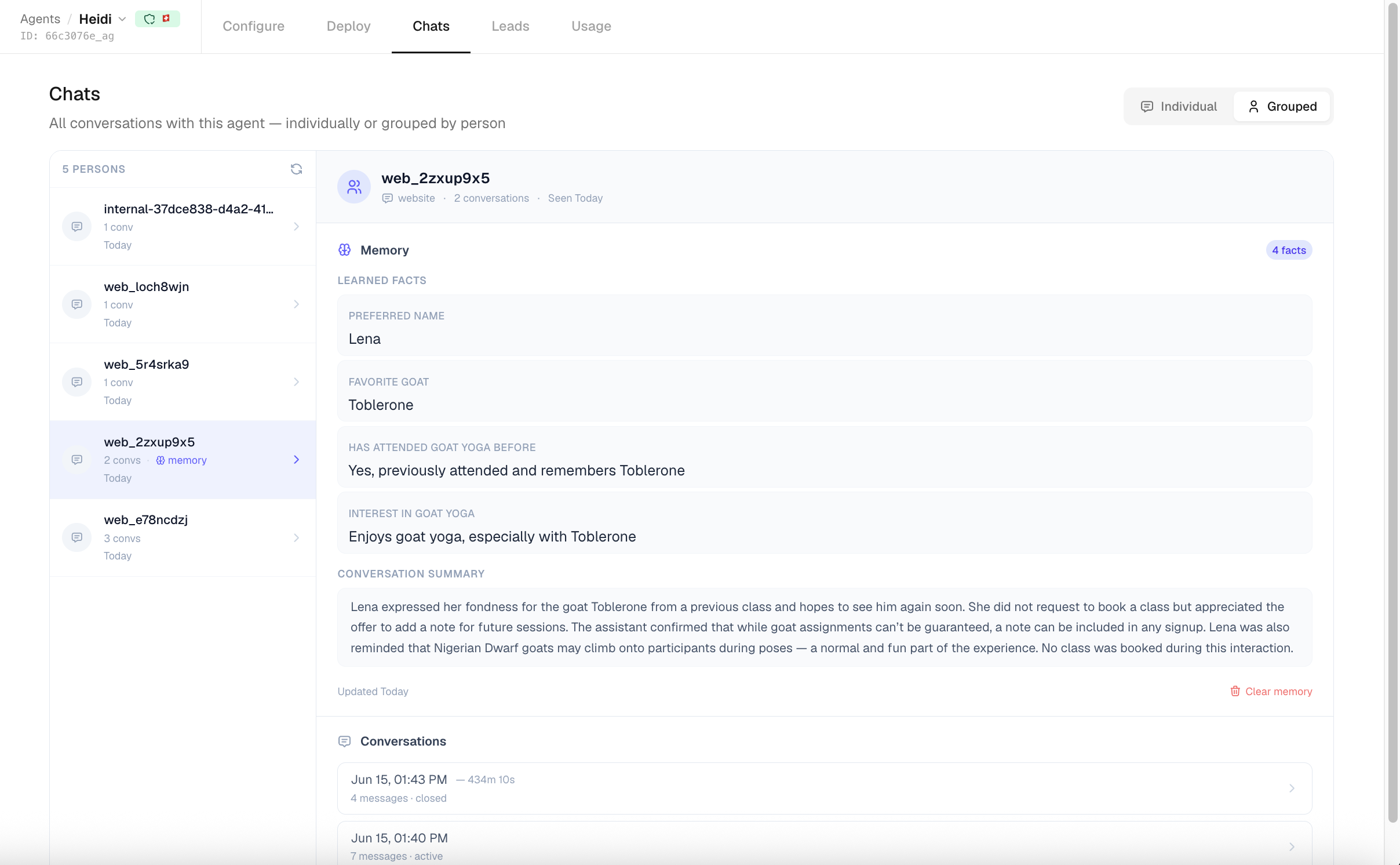
Click a person to open their detail panel on the right. It has three parts:
- Header — the label, channel type, conversation count, and "Seen (relative time)".
- Memory — the facts and summary the agent has learned (see below). Empty when memory is off or nothing has been extracted yet.
- Conversations — up to 50 past conversations with this agent. Expand one to read the full message thread inline; for voice conversations with a recording, an authenticated audio player is shown.
How Customer Memory works
When memory is enabled, an agent keeps two things per person: a list of facts and a single rolling summary.
When facts are extracted
Extraction runs after a conversation closes, as a background task — not live during the chat. So facts and the summary appear shortly after a conversation ends, not while it is happening.
Extraction is skipped (nothing is stored) when:
- The agent has memory turned off.
- The conversation has fewer than 2 messages from the customer — there is nothing meaningful to learn from a single message.
This applies to both chat and voice agents. For voice, extraction runs when the call ends and is marked closed.
What gets remembered
Extraction is done by an LLM that reads the conversation transcript and pulls out persistent facts about the customer (not about the agent). The prompt targets:
- Personal identity — name, age, location, family, relationships.
- Occupation and work preferences.
- Standing instructions — for example "keep answers short", "always confirm before sending".
- Preferences and habits.
- Other important contextual facts.
- Noted contradictions, when the customer says conflicting things.
It deliberately ignores session-only actions such as "asked about product X" or "placed order #123", because those don't carry forward.
Each fact is stored as a short key plus a value, with a confidence of high, medium, or low. When the agent updates memory for a returning customer, it reuses the existing key for a fact rather than creating a duplicate, so re-learning a detail updates it in place.
The rolling summary
Alongside the discrete facts, the agent maintains one conversation summary per person: a concise, past-tense narrative of issues raised, outcomes, topics, and decisions. After each closed conversation it is rewritten to fold in the latest conversation, kept to roughly eight sentences.
What is not guaranteed
- Full conversation transcripts are not copied into memory — they stay in the conversation list and are accessible from the person's detail panel.
- There is no automatic redaction of secrets such as passwords or card numbers. The extractor is asked for persistent customer facts and to skip session-only actions, but nothing in the pipeline guarantees sensitive data is filtered out. Treat memory as customer PII and handle it accordingly.
How memory changes the agent's replies
For a returning person, the agent injects what it remembers into the top of its system prompt before answering:
- A Returning Customer — Remembered Facts section, with facts sorted by confidence (high first) and capped at 40 facts. The agent is instructed to apply them automatically rather than make the customer repeat themselves.
- A Previous Conversation Summary section (when a summary exists), truncated to about 800 characters.
Because this is keyed per channel identity, it only kicks in when the same person (same channel + identifier) returns. A new, unrecognized visitor starts fresh.
Enabling and configuring memory
Memory is configured per agent in the agent's Configure tab, under the Customer Memory section.
- Open the agent and go to Configure.
- Expand Customer Memory.
- Turn on Enable customer memory.
- Choose a Memory retention period.
The retention dropdown offers a fixed set of options:
| Memory retention | Behavior |
|---|---|
| Keep indefinitely (default) | Memory never expires. |
| 30 days | Memory is dropped 30 days after it was last updated. |
| 60 days | Dropped after 60 days. |
| 90 days | Dropped after 90 days. |
| 180 days | Dropped after 180 days. |
| 1 year | Dropped after 365 days. |
Retention is measured from when a person's memory was last updated, and it is enforced in two ways:
- At read time — expired memory is skipped and never injected into the agent's prompt, even before it is deleted.
- By a daily cleanup job — once a day, memory records past their retention window are permanently deleted. Records set to "Keep indefinitely" are never deleted by this job.
Tip
For support agents, 90–180 days is usually enough. For sales with long buying cycles, keep memory indefinitely.
Reviewing and editing memory
From a person's detail panel, the Memory section lets you inspect and correct what the agent has stored.
- Learned Facts — each fact shown as its key (humanized) plus value.
- Conversation Summary — the rolling summary, when one exists.
- Updated (relative time) — when the memory record was last changed.
You can correct memory directly:
- Edit a fact — hover a fact and click the pencil to edit its value inline, then save.
- Delete a single fact — hover a fact and click the × to remove just that fact.
- Clear memory — the red Clear memory button wipes the entire memory record for this person and agent.
Memory is scoped per (person, agent) pair — facts one agent learns are never shared with your other agents, even for the same person. Clearing memory here only affects this agent.
Use Clear memory (or delete individual facts) to honor a customer's data-deletion request.
Conversation History (a separate option)
Independent of Customer Memory, agents have an optional Conversation History setting in the Configure tab (also off by default). When enabled, the agent is shown the recent raw messages from that person's earlier conversations with the same agent — rather than extracted facts — up to a configurable maximum number of messages.
The two features are complementary: Customer Memory gives the agent a distilled set of facts plus a summary, while Conversation History replays actual prior messages. You can enable either, both, or neither.
Form-captured contact details
Separately from memory, when a customer completes one of the agent's built-in forms (for example a contact or appointment form), the name, email, and phone from the submission are saved onto the person record. This happens immediately on submission, only fills a field that is currently empty, and never overwrites a value already stored. It is independent of Customer Memory and works whether or not memory is enabled.
Privacy and data residency
Memory holds personal information about your customers, so handle it responsibly:
- Disclose that your agent may remember details for future interactions.
- Comply with GDPR and local data-protection rules. A retention period helps with data minimization; "Keep indefinitely" does not.
- Honor deletion requests by clearing a person's memory (whole record or individual facts).
All botts.ai data is stored on Swiss-hosted infrastructure. The agent and text models run on Azure OpenAI in the Switzerland region, the memory extraction and summary run on Swiss-hosted Infomaniak AI, and object storage uses Swiss cloud providers.
Last updated on September 13, 2026